


Aura Studio 3
Details https://tw.harmankardon.com/AURA+STUDIO+3.html?dwvar_AURA%20STUDIO%203_color=Black-APAC-Current無線藍芽喇叭
無線藍芽喇叭


獨特優雅之設計
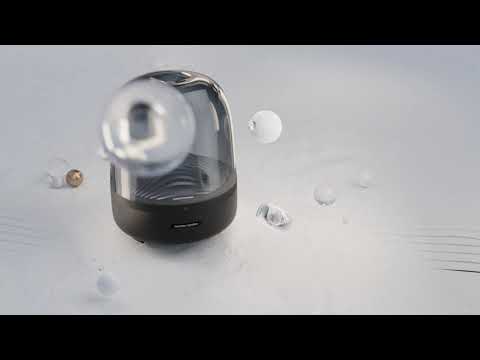
美妙聲音之藝術憑藉圓頂設計、優良材質及環境照明效果,標誌性的 Harman Kardon Aura Studio 3 在您家裡營造出一絲現代感。

360 度覆蓋的出色聲音
風格和實質。Harman Kardon Aura Studio 3 喇叭提供 360 度覆蓋的出色音訊。強勁的重低音喇叭可打造真正沉浸式的聆聽體驗,讓您欣賞更動感的音效。
環境照明
讓優雅的漣漪效應燈光為房間注入寧靜的氛圍。使每次聆聽都成為一場視聽盛宴。

使用藍牙的無線串流傳輸
透過藍牙無線串流傳輸音樂,享受充盈房間的聲音。
標誌性設計,在任何位置都是焦點
將 Harman Kardon Aura Studio 3 放在家裡任何位置。其優雅外形和最小身板,適應能力強,與家庭裝飾完美地融合在一起。
Harman Kardon Aura Studio 3 提供 360 度覆蓋的美妙聲音,憑藉其永恆、標誌性設計提高家庭裝飾的檔次。驚人的藍牙喇叭不僅具備靚麗外觀,更能提供絕佳的音質。本喇叭結合了充盈房間的音訊與整合式環境燈光效果,水波漣漪特點讓您以全新、視覺動態的方式體驗音樂。喇叭的圓頂設計與其小身板一樣低調,無論在家裡哪個房間,本品都能完美地融入其中。
一般規格
- 1 個 Harman Kardon Aura Studio 3
- 1 條電源線
- 1 本快速入門指南
- 1 本安全說明書
- 1 張保固卡

Aura Studio Series
\nNote: This action will erase all settings and Bluetooth data from the device. You will be required to pair and connect to your devices again after this action is done.
\n\n
Aura Studio, Aura Studio 2
\n- Turn the speaker ON
- Press and hold the Volume (+) & Phone button for more than 5 seconds
- All LED indicators will flash and the speaker will power off and be factory reset
\n
Aura Studio 3
\n- Turn the speaker ON
- Press and hold the Light Effect button for more than 10 seconds
- The speaker will power off and be factory reset
\n
Aura Studio 4
\n- Turn the speaker ON
- Press and hold the Volume (+) & Bluetooth button for more than 5 seconds
- The speaker will power off and be factory reset
\n
Aura Studio 5, Aura Studio 5 Wi-Fi
\n- Turn the speaker ON
- Press and hold the Light Mode, Vol +, & Vol - button for more than 7 seconds
- The speaker will power off and be factory reset
Or alternatively;
\n\n
- Open your Harman Kardon One App.
- Navigate to the support tile.
- Select RESTORE FACTORY SETTINGS.
Aura Studio Series
\nNote: This action will erase all settings and Bluetooth data from the device. You will be required to pair and connect to your devices again after this action is done.
\n\n
Aura Studio, Aura Studio 2
\n- Turn the speaker ON
- Press and hold the Volume (+) & Phone button for more than 5 seconds
- All LED indicators will flash and the speaker will power off and be factory reset
\n
Aura Studio 3
\n- Turn the speaker ON
- Press and hold the Light Effect button for more than 10 seconds
- The speaker will power off and be factory reset
\n
Aura Studio 4
\n- Turn the speaker ON
- Press and hold the Volume (+) & Bluetooth button for more than 5 seconds
- The speaker will power off and be factory reset
\n
Aura Studio 5, Aura Studio 5 Wi-Fi
\n- Turn the speaker ON
- Press and hold the Light Mode, Vol +, & Vol - button for more than 7 seconds
- The speaker will power off and be factory reset
Or alternatively;
\n\n
- Open your Harman Kardon One App.
- Navigate to the support tile.
- Select RESTORE FACTORY SETTINGS.


