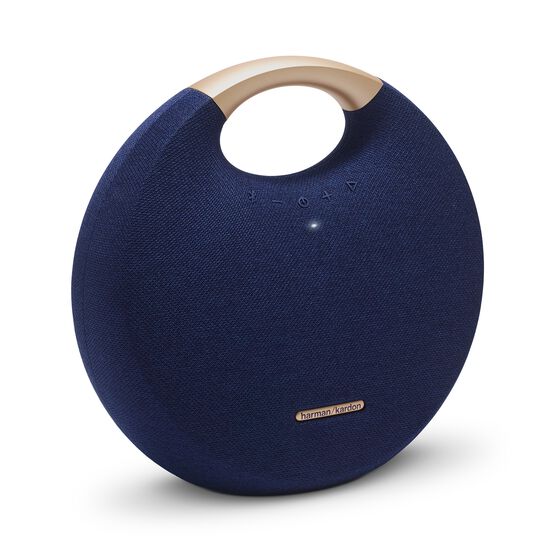


Onyx Studio 5
Details https://tw.harmankardon.com/en/ONYX+STUDIO+5.html?dwvar_ONYX%20STUDIO%205_color=Grey-APAC-CurrentPortable Bluetooth Speaker
Portable Bluetooth Speaker


Wireless Bluetooth Streaming
Stream music wirelessly via Bluetooth to enjoy room-filling sound. Connect up to 2 smart devices at the same time and take turns playing music.

Up to 8 hours of playtime
The rechargeable battery supports up to 8 hours of playtime.

Wireless Dual Sound
Wirelessly connect two Harman Kardon Onyx Studio 5 speakers for an elevated music listening experience.

Premium Materials
Crafted in a unique aluminum and fabric finish for a truly elegant look and feel.
Integrated aluminum handle
Integrated aluminum carrying handle for easy portability.

The Harman Kardon Onyx Studio 5’s advanced and distinctive design is expressed through its signature round silhouette, premium fabric cover of the speaker enclosure and an integrated aluminum handle for easy portability. Destined to be the best sounding, full featured portable Bluetooth speaker in its class, the Onyx Studio 5 offers up to 8 hours of playtime as well as wireless dual sound, which wirelessly connect two Harman Kardon Onyx Studio 5 speakers to elevate music listening experience. Commanding attention at every angle, the Onyx Studio 5 is an iconic design piece in any home.

General Specifications
Dimensions
Control and Connection Specifications
Battery
Features
Spec Sheet (EN)
English 2 MB- 1 x Harman Kardon Onyx Studio 5
- 1 x Power adaptor
- 1 x Quick-Start Guide
- 1 x Safety sheet
- 1 x Warranty card

The latest owner's manuals, quick start guides, and documents.
Onyx Series
\nNote: This action will erase all settings and Bluetooth data from the device. You will be required to pair and connect to your devices again after this action is done.
\n\n
Onyx
\n- Turn the speaker ON
- Press and hold the Bluetooth & Power button for more than 3 seconds
- The speaker will power off and be factory reset
\n
Onyx Mini, Onyx Studio 2, Onyx Studio 3, Onyx Studio 4
\n- Turn the speaker ON
- Press and hold the Volume (+) & Phone button for more than 3 seconds
- The speaker will power off and be factory reset
\n
Onyx Studio
\n- Turn the speaker ON
- Press and hold the Volume (-) & Bluetooth button for more than 3 seconds
- The speaker will power off and be factory reset
\n
Onyx Studio 5, Onyx Studio 6, Onyx Studio 7, Onyx Studio 8, Onyx Studio 9
\n- Turn the speaker ON
- Press and hold the Volume (+) & Bluetooth button for more than 5 seconds
- The speaker will power off and be factory reset
","Answer__c":"
Onyx Series
\nNote: This action will erase all settings and Bluetooth data from the device. You will be required to pair and connect to your devices again after this action is done.
\n\n
Onyx
\n- Turn the speaker ON
- Press and hold the Bluetooth & Power button for more than 3 seconds
- The speaker will power off and be factory reset
\n
Onyx Mini, Onyx Studio 2, Onyx Studio 3, Onyx Studio 4
\n- Turn the speaker ON
- Press and hold the Volume (+) & Phone button for more than 3 seconds
- The speaker will power off and be factory reset
\n
Onyx Studio
\n- Turn the speaker ON
- Press and hold the Volume (-) & Bluetooth button for more than 3 seconds
- The speaker will power off and be factory reset
\n
Onyx Studio 5, Onyx Studio 6, Onyx Studio 7, Onyx Studio 8, Onyx Studio 9
\n- Turn the speaker ON
- Press and hold the Volume (+) & Bluetooth button for more than 5 seconds
- The speaker will power off and be factory reset
","ArticleType":"How_Tos__kav"},{"attributes":{"type":"Knowledge__kav","url":"/services/data/v45.0/sobjects/Knowledge__kav/ka25d000000Xj7cAAC"},"Title":"Is the Dual Wireless Sound for the Onyx Studio 5 compatible with the Onyx Studio 3 that also features the Dual Wireless Sound?","Id":"ka25d000000Xj7cAAC","ArticleNumber":"000031304","Question__c":"Is the Dual Wireless Sound for the Onyx Studio 5 compatible with the Onyx Studio 3 that also features the Dual Wireless Sound?*","Process__c":"No. The Dual Wireless Sound featured in the Onyx Studio 5 only gives you the capability to connect to a second Onyx Studio 5. It is not possible to connect the Onyx Studio 3 and 5 together. The Onyx Studio 5 can only be connected to no more than one other Onyx Studio 5.","Answer__c":"No. The Dual Wireless Sound featured in the Onyx Studio 5 only gives you the capability to connect to a second Onyx Studio 5. It is not possible to connect the Onyx Studio 3 and 5 together. The Onyx Studio 5 can only be connected to no more than one other Onyx Studio 5.","ArticleType":"How_Tos__kav"}]}


